

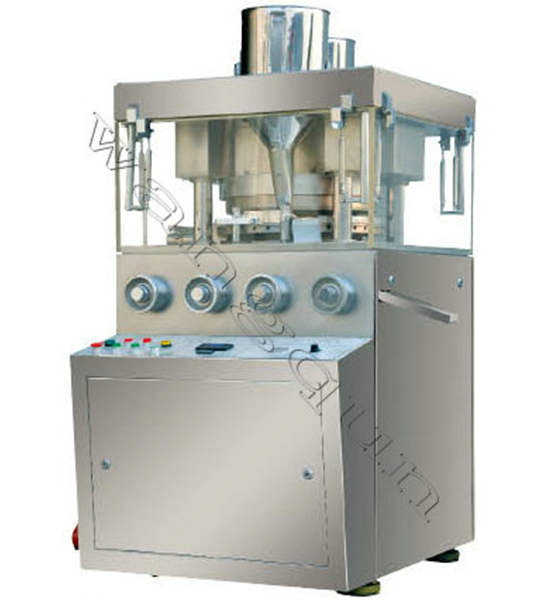
Step-by-Step Guide to Safe Disinfection Tablet Press Operation
Introduction
Disinfection tablets are widely used in water treatment, healthcare, and sanitation to eliminate harmful microorganisms. A tablet press is a critical machine in manufacturing these tablets, ensuring consistent dosage and quality. However, improper operation can lead to equipment damage, contamination, or workplace hazards.
This guide provides a step-by-step approach to safely operating a disinfection tablet press, covering pre-operation checks, machine setup, operation procedures, cleaning, and maintenance. Following these steps will help ensure operator safety, product quality, and machine longevity.
---
1. Pre-Operation Safety Checks
Before operating the tablet press, perform the following safety checks:
1.1 Personal Protective Equipment (PPE)
- Wear gloves, safety goggles, and a lab coat to prevent chemical exposure.
- Use respiratory protection if handling powdered disinfectants that may produce dust.
- Ensure closed-toe shoes to prevent foot injuries.
1.2 Machine Inspection
- Check for loose bolts, damaged parts, or leaks in hydraulic/pneumatic systems.
- Verify that emergency stop buttons are functional.
- Inspect electrical connections for signs of wear or damage.
1.3 Material Verification
- Confirm that the disinfection powder or granules meet quality standards (moisture content, particle size).
- Ensure lubricants and cleaning agents are compatible with the disinfectant material.
1.4 Workspace Preparation
- Clear the area of unnecessary tools or debris.
- Ensure adequate ventilation to prevent dust accumulation.
- Place spill kits and fire extinguishers nearby in case of emergencies.
---
2. Machine Setup & Calibration
2.1 Tooling Installation
- Select the correct punches and dies based on tablet size and shape.
- Lubricate tooling with food-grade or pharmaceutical-grade lubricant to prevent sticking.
- Securely fasten punches and dies to avoid misalignment.
2.2 Machine Calibration
- Adjust compression force based on material hardness (too much force can damage tablets; too little may cause crumbling).
- Set tablet weight using the filling cam or feeder adjustment.
- Run a test batch (5-10 tablets) to check weight, hardness, and thickness.
2.3 Feeder & Hopper Setup
- Fill the hopper with pre-sieved disinfection powder to prevent clogging.
- Adjust the feeder speed to ensure consistent material flow.
- Check for powder segregation (uneven distribution of active ingredients).
---
3. Operation Procedures
3.1 Starting the Tablet Press
1. Turn on the main power supply.
2. Engage the hydraulic or mechanical drive system.
3. Start the machine at low speed to observe initial tablet formation.
3.2 Monitoring Tablet Quality
- Regularly check:
- Tablet weight (use a digital scale every 15-30 minutes).
- Hardness (use a tablet hardness tester).
- Thickness (calipers should confirm uniformity).
- If tablets are too soft, cracked, or sticking, adjust compression force or lubrication.
3.3 Handling Jams or Malfunctions
- Stop the machine immediately if:
- A punch or die is damaged.
- Powder spills excessively.
- Unusual noises or vibrations occur.
- Follow lockout/tagout (LOTO) procedures before clearing jams.
3.4 Emergency Procedures
- Press the emergency stop if:
- A mechanical failure occurs.
- Electrical sparks or smoke are detected.
- A chemical spill or exposure happens.
- Evacuate if toxic fumes are released and follow workplace safety protocols.
---
4. Cleaning & Maintenance
4.1 Post-Operation Cleaning
1. Power off and unplug the machine.
2. Remove residual powder using a vacuum or brush (avoid compressed air to prevent dust dispersion).
3. Disassemble punches, dies, and hopper for deep cleaning.
4. Use approved disinfectant wipes or solutions to sanitize surfaces.
4.2 Lubrication & Wear Inspection
- Apply machine-grade lubricant to moving parts (e.g., cams, bearings).
- Replace worn-out punches or dies to prevent tablet defects.
4.3 Scheduled Maintenance
- Weekly:
- Inspect hydraulic/pneumatic systems.
- Check electrical wiring.
- Monthly:
- Replace filters and seals.
- Calibration check for compression force.
---
5. Best Practices for Long-Term Safety & Efficiency
5.1 Operator Training
- Ensure all operators are trained in machine operation, safety protocols, and emergency response.
- Conduct regular refresher courses on new procedures.
5.2 Documentation & Record-Keeping
- Maintain logs for:
- Batch records (material used, tablet specifications).
- Maintenance schedules (lubrication, part replacements).
- Incident reports (malfunctions, spills, injuries).
5.3 Environmental & Health Considerations
- Store disinfection materials in sealed, labeled containers away from moisture.
- Dispose of waste according to local environmental regulations.
- Monitor air quality for dust or chemical exposure risks.
---
Conclusion
Safe operation of a disinfection tablet press requires proper training, regular maintenance, and strict adherence to safety protocols. By following this step-by-step guide, operators can minimize risks, ensure product consistency, and extend the machine’s lifespan.
Always prioritize safety over speed, and never bypass safety mechanisms. A well-maintained tablet press ensures high-quality disinfection tablets for effective sanitation and water treatment applications.
Would you like additional details on any specific section?
Copyright © 2025 Changzhou Wangqun Pharmaceutical Machinery Co., Ltd. Tous droits réservés.
Plan du siteCe site Web utilise des cookies pour vous garantir la meilleure expérience sur notre site Web.
 English
 Español
 Pусский
 العربية



 Téléphone
Commentaire
(0)